
White TV Units
White TV units create a lighter lower front beneath a screen and equipment that may remain visually distinct. Start with where white appears on the top, doors and supports. A broadly pale cabinet and selected white details make different room features. Compare actual shade, texture and sheen with the permanent wall and furniture instead of expecting every white surface to match.
Read moreRead less
Use this collection to choose that relationship within real equipment space. TV and entertainment units provide the wider setup guide. Ivory TV units offer an off-white direction, while black TV units compare a darker lower band. Choose supported television dimensions, device compartments and installed access before using the light appearance to finish the entertainment wall.
Showing the single result
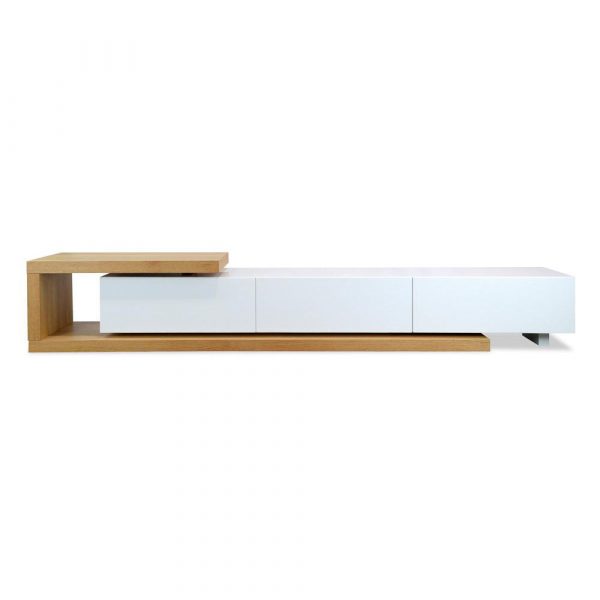

Compare the white front with the screen wall’s actual contrast
Review the complete cabinet with the television and ordinary devices present. Darker equipment can remain a clear feature against a light front, so decide what should be visible rather than selecting an empty white unit image. Check handles, door gaps and any other material that defines the cabinet’s outline.
Use permanent walls and floor as references for actual undertone and sheen. Similar white names cannot establish an exact match across furniture and paint. Ask about the selected coating when close coordination matters. Grey TV units provide another neutral direction. Choose the amount of white at full cabinet scale, with equipment and top objects included before smaller accessories are added to the wall composition.
Keep pale appearance separate from support and useful capacity
Read the complete television’s dimensions and weight in its actual installation configuration, including its stand where used. Compare the full outline with usable top space and documented loading, rather than diagonal screen size or feet alone. White does not establish support capacity or a smaller physical cabinet.
Measure devices with their connections and required operating space. Read actual internal compartments and features, then follow each device’s ventilation instructions. TV units with shelves focus on equipment areas; TV units with drawers examine smaller sorting. Choose those practical positions first so the preferred pale front does not conceal an equipment layout that remains unresolved.
Choose contact care and access for the installed light cabinet
Read top, doors and supports separately. White does not establish stain resistance, painted solid timber or permission to use every household cleaner. Follow the actual coating guidance and keep electronic-device care independent. Confirm cable features rather than assuming a neat light front supplies hidden routing.
Plot full depth, documented openings and connection access with seating in use. TV unit setup advice examines that installed routine. Read assembly and securing instructions and check delivery-component access, then ask benssur about missing usable or finish details. Choose the white front and edges beside the wall and dark equipment after the connected setup and opening route work.